Are you tired of websites blocking your access or tracking your online moves? The Urban VPN Extension for Firefox might be the simple solution you’ve been looking for.
Imagine browsing the web freely, without restrictions, and keeping your personal information safe at the same time. You’ll discover how this powerful tool can change your internet experience for the better. Keep reading to find out why Urban VPN could be the key to unlocking a faster, safer, and more private browsing session every time you go online.
Why Choose Urban Vpn
Choosing the right VPN extension for Firefox matters a lot. Urban VPN offers a reliable and easy way to protect your online privacy. It keeps your data safe without slowing down your browsing. Many users trust Urban VPN for secure and fast access to the internet.
Benefits Of Using Urban Vpn
Urban VPN provides strong encryption to protect your data. It hides your IP address, so websites cannot track you. The extension is free to use, with no hidden costs. It works smoothly on Firefox without causing delays. You can connect to servers from many countries. This helps you access content from different regions easily. Urban VPN also does not keep logs of your activity. Your privacy stays protected at all times.
Comparison With Other Vpn Extensions
Urban VPN stands out for its no-cost service. Many other VPNs ask for payment or offer limited free versions. It offers more server locations than most free options. Some VPNs slow down your browser, but Urban VPN keeps speeds high. Privacy policies are clear and simple, unlike some competitors. The extension is easy to install and use for all skill levels. It provides good protection without complex settings.
Installing Urban Vpn On Firefox
Installing Urban VPN on Firefox is a simple process. It helps protect your privacy and access blocked sites. This guide will walk you through the steps to add Urban VPN to your browser. Follow along for easy setup.
Step-by-step Installation Process
Open your Firefox browser. Go to the Firefox Add-ons website.
Type “Urban VPN” in the search bar. Find the Urban VPN extension in the results.
Click the “Add to Firefox” button. A popup will appear asking for permissions.
Click “Add” to confirm. The extension will download and install automatically.
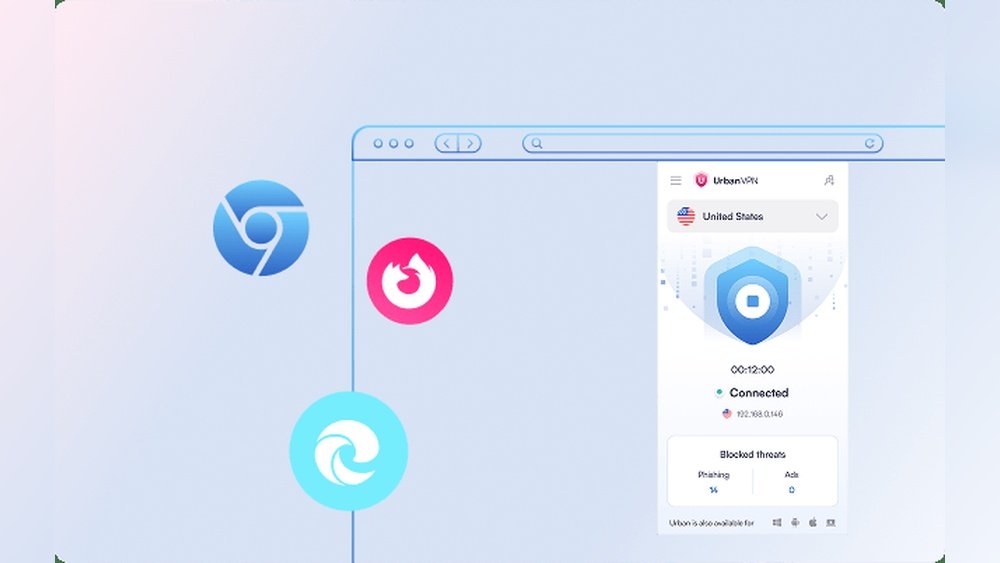
Once installed, you will see the Urban VPN icon near the address bar. Click it to open and start using the VPN.
Common Installation Issues And Fixes
Sometimes, the extension may not install correctly. Check your internet connection first.
Clear your browser cache if the download fails. Restart Firefox and try again.
If the extension does not appear after installation, disable other VPN or proxy extensions. Conflicts can cause issues.
Make sure your Firefox is up to date. Older versions might block new extensions.
Contact support if problems continue. Most issues have simple fixes.
Configuring Urban Vpn Settings
Configuring the Urban VPN extension on Firefox is simple and quick. Adjusting settings helps improve your browsing privacy and security. It also lets you choose the best server for your needs.
Below are the key settings you can change to get the most out of Urban VPN.
Adjusting Privacy Preferences
Open the Urban VPN extension menu. Find the privacy settings section. Turn on options like “block trackers” to stop websites from following you. You can also clear your browsing data automatically. This keeps your online activity private and safe.
Selecting Server Locations
Urban VPN offers many server locations worldwide. Pick a country to access content from that region. The extension shows a list of servers with low traffic. Choose one to get faster speeds. Switching servers is easy and can improve your connection.
Enabling Security Features
Security features protect your data on public Wi-Fi and other networks. Turn on the “auto-connect” feature to start the VPN automatically. Enable the kill switch to stop internet if VPN drops. These settings help keep your information safe at all times.
Using Urban Vpn Effectively
Using Urban VPN Extension for Firefox can improve your online privacy and access. The extension is simple to use but works best with a few tips. These tips help you get fast speeds and secure connections. Understanding how to access geo-restricted content will also make your browsing more useful.
Tips For Optimal Performance
Choose a server close to your location for better speed. Avoid using servers during peak hours to reduce lag. Clear your browser cache regularly to keep the extension running smoothly. Turn off other VPNs or proxies to prevent conflicts. Keep the Urban VPN extension updated for the latest features and fixes.
How To Access Geo-restricted Content
Select a server in the country where the content is available. Refresh the webpage after connecting to the chosen server. Use the Firefox private window to avoid cookies revealing your location. Check if the content is available in the selected country before connecting. Remember, some websites might block VPN traffic, so try different servers if access fails.
Troubleshooting Urban Vpn
Troubleshooting Urban VPN can help fix common issues fast. Problems like connection drops or slow speeds affect user experience. Knowing simple steps to solve these issues saves time and stress. This guide covers key tips for smooth use of Urban VPN Extension on Firefox.
Resolving Connection Problems
Start by checking your internet connection. A weak or unstable network stops Urban VPN from working properly. Restart your router or switch to a different Wi-Fi. Make sure the Urban VPN extension is updated to the latest version. Sometimes, disabling other VPNs or proxy settings helps avoid conflicts. Clear your browser cache and cookies to remove old data. If the problem stays, try reinstalling the Urban VPN extension.
Handling Slow Speeds
Slow speeds cause frustration during browsing or streaming. Choose a server close to your location for faster connection. Avoid servers with heavy traffic by switching to less crowded ones. Close unused browser tabs and apps that use internet bandwidth. Restart Firefox to refresh the browser’s performance. Check if your device is running background updates or downloads. These steps improve speed and keep Urban VPN working well.

Credit: addons.mozilla.org
Privacy And Security Considerations
Privacy and security are key when using any VPN extension. Urban VPN for Firefox offers features that help keep your data safe while browsing. Understanding how it protects you and its limits helps you use it wisely.
How Urban Vpn Protects Your Data
Urban VPN hides your real IP address. This stops websites from tracking your location. It also encrypts your internet traffic. Encryption makes your data unreadable to outsiders. This includes hackers and internet providers.
The extension blocks some trackers automatically. This reduces the chances of your activity being monitored. It also prevents certain types of cyber attacks. Urban VPN provides a layer of security on public Wi-Fi networks.
Limitations To Keep In Mind
Urban VPN does not guarantee full anonymity. Some data may still be exposed depending on your activity. The extension relies on shared networks, which might affect speed and reliability.
Not all websites or apps work smoothly with this VPN. Certain services might detect and block VPN traffic. Urban VPN also does not protect against malware or phishing attacks.
Always use additional security tools for better protection. Understand these limits to use Urban VPN safely and effectively.
Alternatives To Urban Vpn
Urban VPN is a popular choice for many Firefox users. Still, some may want to explore other options. Different VPN extensions offer various features and benefits. Choosing the right one can improve your browsing experience and security. Here are some alternatives worth considering.
Other Popular Vpn Extensions For Firefox
Firefox supports many VPN extensions. Some well-known names include Windscribe, TunnelBear, and Hotspot Shield. Windscribe offers a free plan with good data limits. TunnelBear is user-friendly and great for beginners. Hotspot Shield provides fast speeds with a simple interface. Each option has unique features. Try a few to find the best fit for your needs.
When To Switch Vpn Providers
Switching VPNs can happen for many reasons. Slow connection speeds or frequent disconnections can be signs. Limited server locations or poor privacy policies are other issues. If your current VPN does not protect your data well, it is time to change. Also, if you need access to more streaming sites, try a different provider. Always choose a VPN that matches your online habits and security needs.

Credit: www.reddit.com
Credit: www.urban-vpn.com
Frequently Asked Questions
What Is Urban Vpn Extension For Firefox?
Urban VPN Extension for Firefox is a free browser add-on. It helps users browse securely by masking their IP address. It also unlocks geo-restricted content and enhances online privacy while using Firefox.
How To Install Urban Vpn Extension On Firefox?
To install, visit the Firefox Add-ons store. Search for “Urban VPN Extension” and click “Add to Firefox. ” Follow the prompts, and the extension will appear in your browser toolbar.
Is Urban Vpn Extension Safe For Firefox Users?
Yes, Urban VPN uses strong encryption to protect your data. However, always download from official sources. Avoid sharing sensitive info on public networks, even with VPN protection.
Can Urban Vpn Extension Unblock Streaming Sites?
Yes, Urban VPN can bypass geo-restrictions on popular streaming platforms. It allows access to content blocked in certain regions, enhancing your viewing options securely.
Conclusion
Urban VPN Extension for Firefox offers simple and secure browsing. It helps protect your privacy and access sites safely. The extension works fast without slowing your browser. Easy to install and use, it suits all skill levels. Stay safe online while enjoying freedom on the web.
Try it to see how it fits your browsing needs. Privacy matters, and this tool helps keep it. Choose smart browsing with Urban VPN on Firefox today.